What's new
Dictly.Live v2.0: A Complete Challenge Loop for Mandarin Listening
Dictly.Live v2.0 turns subtitle-off Mandarin dictation into a complete challenge loop with sentence prompts, boss battles, victory review, personal progress, and vocabulary support.
Mandarin listening practice often breaks at the same hidden point: you can follow the meaning with subtitles, but the sentence disappears when the text is gone.
Dictly.Live v2.0 is built around that gap.
This release turns the logged-in practice experience into a full Home v2 Challenge Loop: choose a podcast, listen sentence by sentence, type what you heard, get character-level feedback, clear the episode, review the result, and carry the progress into your next session.
It is the biggest Dictly.Live update so far because the product is no longer just a place to play listening material and submit dictation. It is now a focused training surface for subtitle-off, sentence-level Mandarin dictation with measurable feedback.
What v2.0 changes
The main change is simple: Dictly.Live now treats a listening session as a challenge that has a beginning, a clear practice path, and an ending worth reviewing.
In v2.0, each podcast episode becomes one challenge. Each Chinese subtitle cue becomes one prompt. Your job is to hear the cue, hold it in memory, type the characters, and submit the answer before moving on.
That structure matters because serious listening practice needs more than exposure. It needs a loop:
| Practice moment | What v2.0 does | Why it helps |
|---|---|---|
| Before the challenge | Shows the episode, speakers, preview audio, and vocabulary support | You can settle into the material before writing |
| During the challenge | Plays one cue at a time and asks for exact Chinese input | The sentence becomes testable instead of vague |
| After a mistake | Highlights wrong slots and keeps you on the same cue | You repair the specific sound-to-character mismatch |
| After a correct answer | Advances the cue, builds combo, and reduces boss HP | Momentum stays tied to accuracy |
| After a clear | Shows grade, XP, clear time, max combo, mistakes, replay, and lyric review | The session ends with evidence you can learn from |
The goal is not to make Mandarin practice louder or busier. The goal is to make the active listening loop easier to repeat.
Hear it. Hold it. Write it. Check it. Replay it.
That is the core of Dictly.Live v2.0.
A focused Home surface
After sign-in, Home is now centered on the v2 challenge loop.
The older scattered surfaces have been reduced so the main screen can do one job well: get you into a Mandarin listening challenge without forcing you to decide between too many unrelated tools.
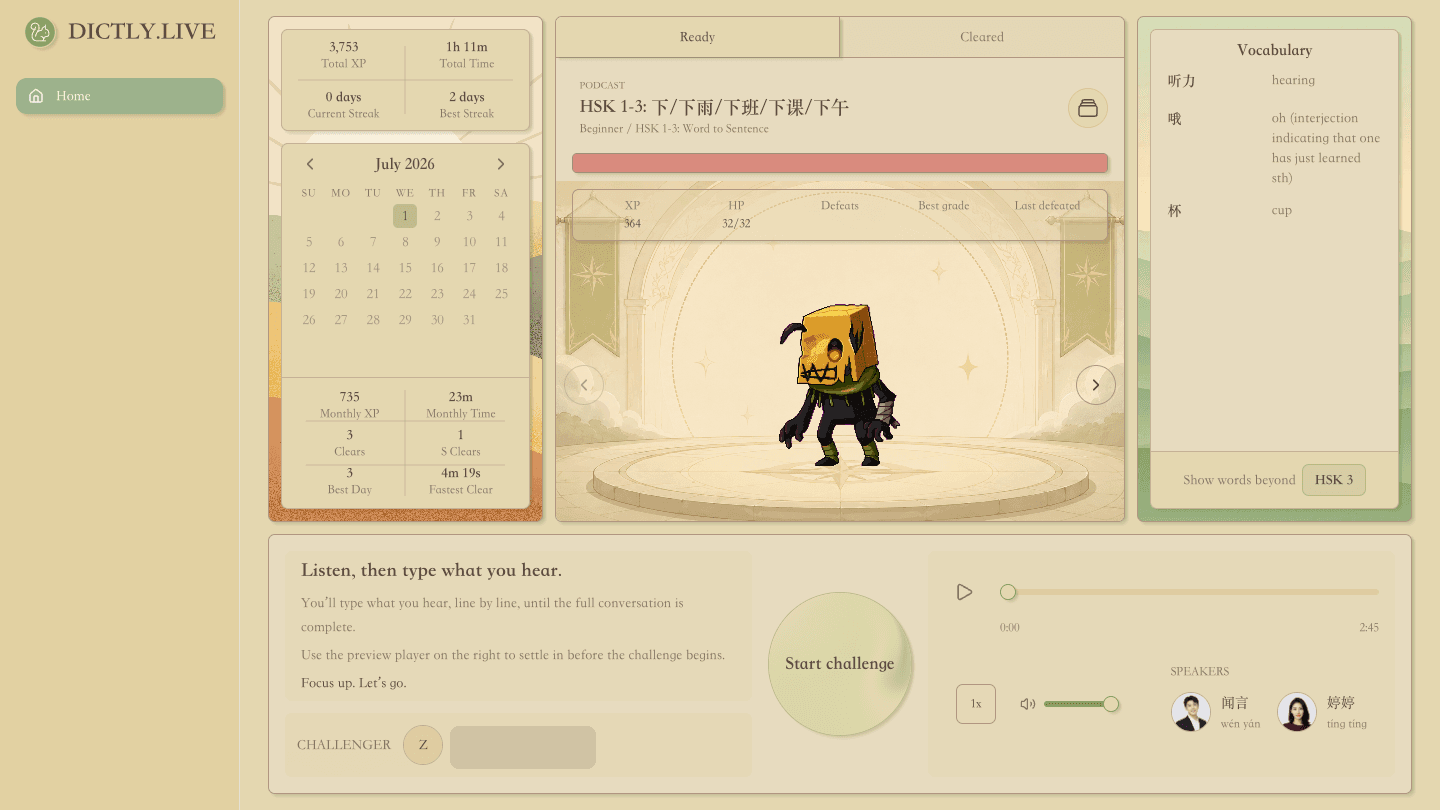
The Home layout is organized into four working areas:
| Area | What you see | Learning role |
|---|---|---|
| Personal Panel | Total XP, total time, streaks, monthly heatmap, clears, S clears, best day, and fastest clear | Shows whether your practice is becoming a habit |
| View Area | Ready and Cleared filters, episode details, boss stage, HP, XP, and battle summary | Lets you choose what to challenge next |
| Vocabulary Panel | Current-podcast vocabulary, HSK threshold filter, English definitions, and pinyin tooltips | Gives support without turning the session into a transcript-first study page |
| Challenge Area | Preview audio, Start challenge, cue input, mistakes, hints, combo, and settlement | Runs the actual subtitle-off dictation loop |
The Ready and Cleared split is especially important. Ready episodes are the challenges you have not cleared yet. Cleared episodes keep their record so you can return to known material and compare your performance over time.
This keeps the app from becoming a loose podcast browser. The question is always practical:
What can I challenge now, and what have I already cleared?
One sentence at a time
The v2 Challenge Area is built for exact sentence listening.
When a challenge starts, Dictly.Live hides full-podcast seeking and focuses the player on the current cue. You are not asked to listen broadly and guess. You are asked to reproduce one Mandarin line from audio.
The input uses a slot-based Chinese answer field, so the sentence is visible as a structure before the answer is visible as text. When you submit a wrong answer, v2 keeps you on the same cue and marks the mistake slots. When you submit the correct answer, the challenge advances.
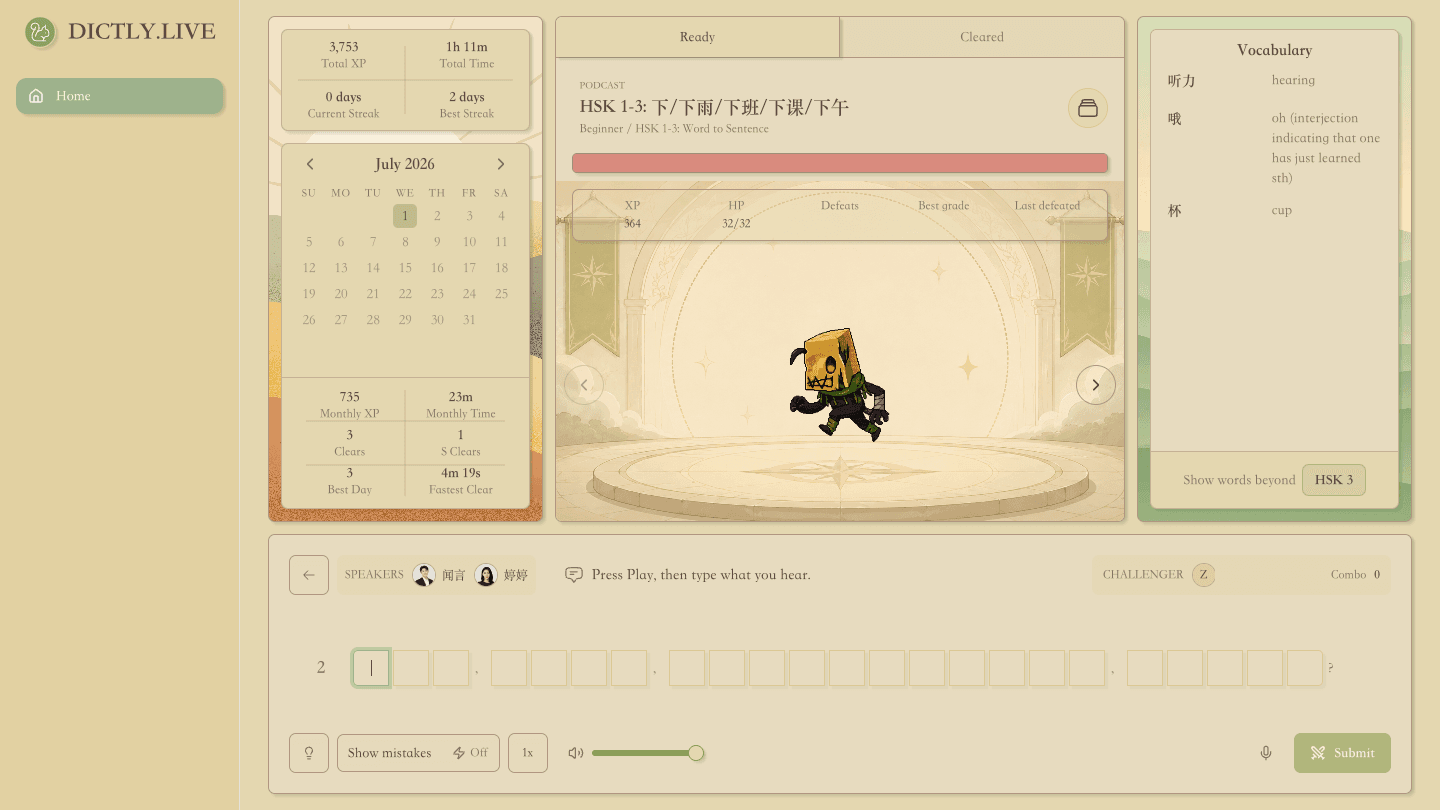
Hints are deliberately narrow. The hint control applies to the focused slot, first showing pinyin and then the correct character for that slot. It does not fill the answer for you, and it does not replace the need to listen first.
That makes hints useful without letting them become subtitles in disguise.
The best use is after an honest attempt:
- Listen to the cue without reading the answer.
- Type what you heard.
- If one slot is stuck, ask for pinyin.
- If it is still stuck, reveal that one character.
- Replay the cue with the correction fresh.
This is the difference between assistance and rescue. v2 gives enough support to keep practice moving, but the main work still happens in your ear.
Feedback that survives the session
Mistakes are no longer only a moment on the screen.
When you submit a wrong answer, Dictly.Live records a cue-level mistake asset for the current podcast. That means the product can preserve what went wrong at the sentence level: which cue, what you submitted, and where the mismatch happened.
For the learner, the benefit is simple: the app can treat a mistake as a learning object, not just a failed submit.
Victory also has a clearer shape. When you clear the final cue, the settlement appears immediately so the session does not feel like it disappears into a loading state. The result includes:
- grade
- XP gained
- clear time
- max combo
- mistake count
- replay controls
- Lyric Board review
Grade is based on mistake rate, not on speed or vibes. XP is based on the podcast difficulty and dictation word count. That keeps the feedback easy to read: accuracy tells you how clean the clear was, while XP rewards the completed work.
The settlement is also designed for review. You can replay the audio and scan the lyrics inside the modal, so the best moment to repair a weak sentence happens right after the challenge, while the sound is still in memory.
Progress you can actually read
v2 adds a Personal Panel because serious listening practice needs visible continuity.
Instead of only asking whether you practiced today, the new panel shows how practice is accumulating:
- Total XP and total listening time show long-term volume.
- Current Streak and Best Streak show habit rhythm.
- The monthly heatmap shows whether practice is clustered or consistent.
- Monthly XP, monthly time, clears, and S clears show recent output.
- Best Day and Fastest Clear give the month a few memorable anchors.
The point is not to turn Mandarin into a scoreboard for its own sake. The point is to make listening progress less vague.
If your listening work is invisible, it is easy to drift back into passive exposure. v2 makes the work visible enough that you can decide what to do next.
Vocabulary without breaking the listening loop
Mandarin dictation is not only an ear problem. Sometimes the sentence breaks because a word is unfamiliar, a compound is above your current level, or a pronunciation is easy to confuse.
The new Vocabulary Panel gives support for the current podcast without taking over the session.
It generates a compact vocabulary list for the current content, shows English definitions, and lets you filter by HSK threshold. Pinyin appears through focused tooltips rather than being printed everywhere by default.
That design choice is deliberate. If pinyin is always visible, learners may read before they listen. v2 keeps the main screen focused on audio-first practice while still making vocabulary help available when you need it.
The result is a better balance:
| Need | v2 response |
|---|---|
| I want to preview hard words | Use the Vocabulary Panel before starting |
| I do not want pinyin to dominate the page | Keep pinyin hidden until hover or focus |
| I only want words beyond my level | Adjust the HSK threshold |
| I need to stay in the challenge | Keep the word support beside the boss and cue input |
For HSK learners, this is especially useful. You can train sentence-level listening while still noticing which words are pushing beyond your current vocabulary band.
A lighter preview path for visitors
Dictly.Live v2.0 also keeps the public podcast preview lightweight.
Visitors can open /podcast, preview a real listening episode, inspect Chinese and English subtitles, and then enter full challenge practice after signing in. The preview does not pretend to be the logged-in product. It does not include real challenge input, progress saving, or scoring.
That boundary is useful.
Public preview is for sampling the material. Logged-in Home is for doing the work.
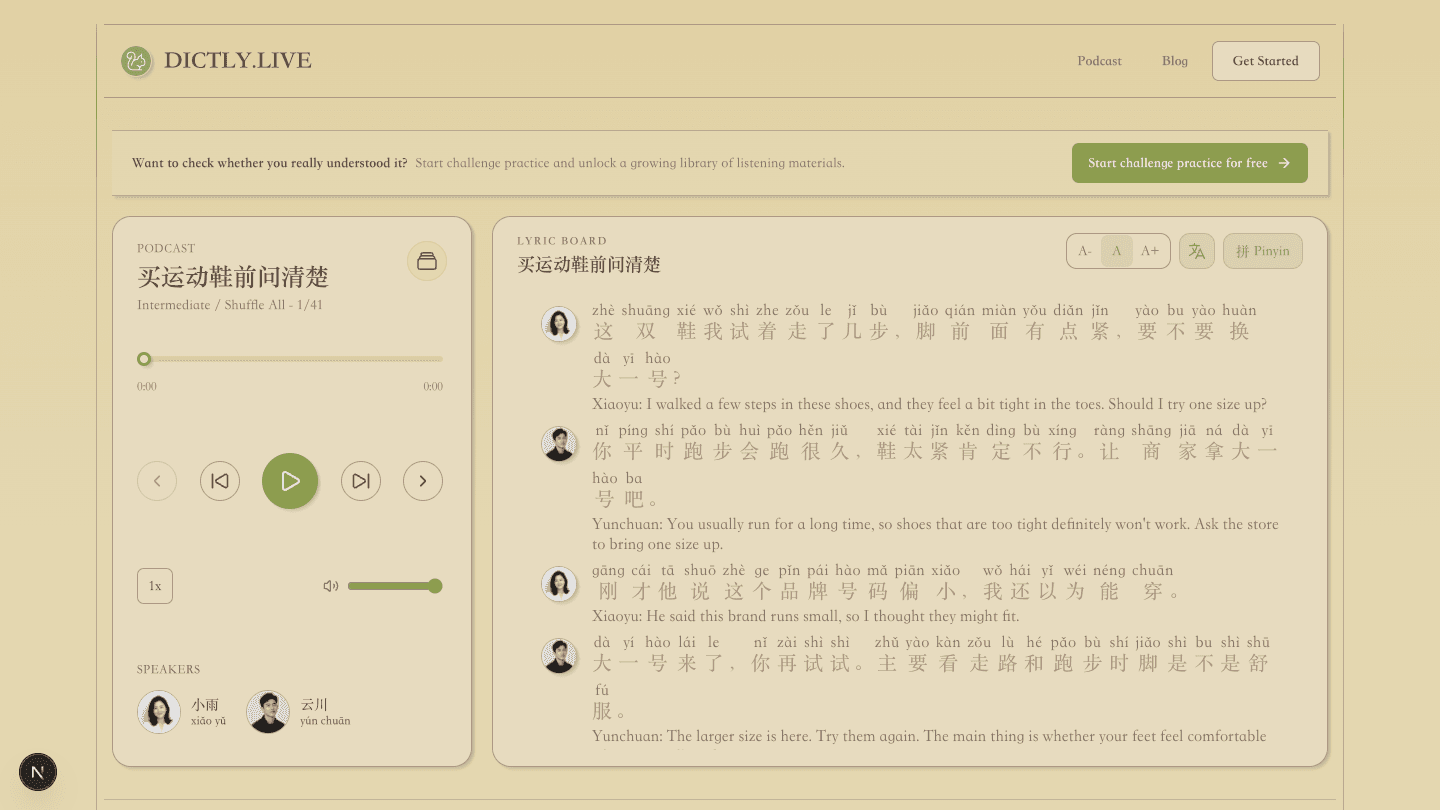
If you arrive from a podcast link or from the public site, you can see the listening material first. When you are ready to test whether you really understood it, the challenge CTA takes you into the full loop.
Why this matters for Mandarin learners
The learning problem Dictly.Live is built around has not changed:
Understanding with subtitles is not the same as listening.
The product change in v2.0 is that Dictly.Live now supports the whole practice arc around that problem.
Before v2.0, a learner could use Dictly.Live for focused dictation practice, but the surrounding experience was less complete. In v2.0, the product more clearly answers the questions a serious learner asks during a session:
| Learner question | v2 answer |
|---|---|
| What should I practice next? | Ready and Cleared challenge filters |
| What am I listening to? | Episode, speakers, preview audio, and vocabulary support |
| Can I hear this sentence exactly? | Current-cue dictation input |
| Where did I miss it? | Slot-level mistake feedback |
| Should I get help? | Focused pinyin and character hints |
| Did I finish cleanly? | Grade, mistakes, combo, clear time, and XP |
| Am I building a habit? | Streaks, heatmap, monthly summary, and total progress |
That is the difference between a tool that plays Mandarin audio and a tool that trains listening accuracy.
What v2.0 is not
This release is focused, and that focus is intentional.
Dictly.Live v2.0 is not an all-in-one Chinese curriculum. It does not replace reading, conversation practice, vocabulary review, grammar study, teachers, or HSK mock tests.
It is strongest when you need one specific training layer:
subtitle-off Mandarin listening, one sentence at a time, with character-level feedback and repeatable progress.
It also does not add social leaderboards, paid subscriptions, speech-recognition scoring, or mobile app support in this release. The current product is still centered on the web-based Home v2 challenge loop, public podcast preview, account, and feedback flows.
That constraint is part of the product direction. Listening accuracy is a narrow skill, but it is a skill that many Mandarin learners undertrain because normal listening tools make it too easy to stay passive.
How to try v2.0
Use v2.0 for a short session first.
- Open Dictly.Live and sign in.
- Stay on Ready and choose a difficulty or collection.
- Preview the episode and vocabulary for one minute.
- Start the challenge.
- Listen to each cue before typing.
- Use hints only after an honest attempt.
- Read the victory settlement before starting another episode.
Ten minutes is enough for a real session if you keep the loop strict.
Do not measure the session by how much Chinese you consumed. Measure it by whether you made one sentence clearer than it was before.
That is the promise of Dictly.Live v2.0:
listening accuracy, not just exposure.